Yes, ChatGPT can make an invoice, and the math is better than its reputation. We gave it the same freelance job five times on the free plan, with an hourly line, a discount and tax, and it got every number right, every time.
What it got wrong was everything around the numbers. None of the five invoices told the client how to pay. None had a contact email or phone number, or the date the work was done. Each one invented a different invoice number. And most of them still opened with some version of "your invoice is ready to send". The numbers say how much you're owed. Those missing details decide when the money arrives.
That's an easy trap if you're busy, because the result looks finished. Two came back as clean, professional PDFs. So the useful question is what you have to add before you hit send.
Photo by SHVETS production on Pexels
Can ChatGPT make an invoice? What you get
Ask ChatGPT for an invoice and you'll get one of three things, depending on your plan and settings:
- An invoice in the chat. A formatted block or table you can copy into a document or email. This is what the free plan gave us with Thinking switched off.
- A PDF to download. With Thinking switched on, ChatGPT built a one-page PDF both times we tried.
- A document or spreadsheet. Through ChatGPT Work, ChatGPT can create documents and spreadsheets, including Google Docs and Sheets. OpenAI's help center says availability depends on your plan, workspace settings and the file type.
On the free plan, the PDF route can run out. When we asked for a PDF, our free account said its data analysis tool was temporarily unavailable and might be back in about 23 hours. Later, with Thinking on, it made two anyway, so don't count on getting a file every time.
We tested it: 5 invoices, one prompt
On October 26, 2026, we used a free ChatGPT account and opened a new chat for each attempt, three with Thinking off and two with it on. The client and freelancer are made up. Every chat got this prompt:
The right answer is a $1,588.75 subtotal, $1,488.75 after the discount, $119.10 tax and a $1,607.85 total, due November 9. Here's how the five invoices did:
| Check | Result |
|---|---|
| Math, including 7.5 × $72.50 and discount before tax | 5 of 5 correct |
| Due date | 5 of 5 correct |
| How the client can pay | 0 of 5 |
| Your email or phone number | 0 of 5 |
| Date the work was done | 0 of 5 |
| Invoice number | 5 different formats |
| 0 of 3 with Thinking off, 2 of 2 with it on |
ChatGPT will happily bill the bakery $1,607.85. It just won't tell them where to send it.
Five chats is a small test, and our account had memory switched on, so earlier chats may have shaped later answers. But every invoice shared the same gaps, with Thinking on or off.
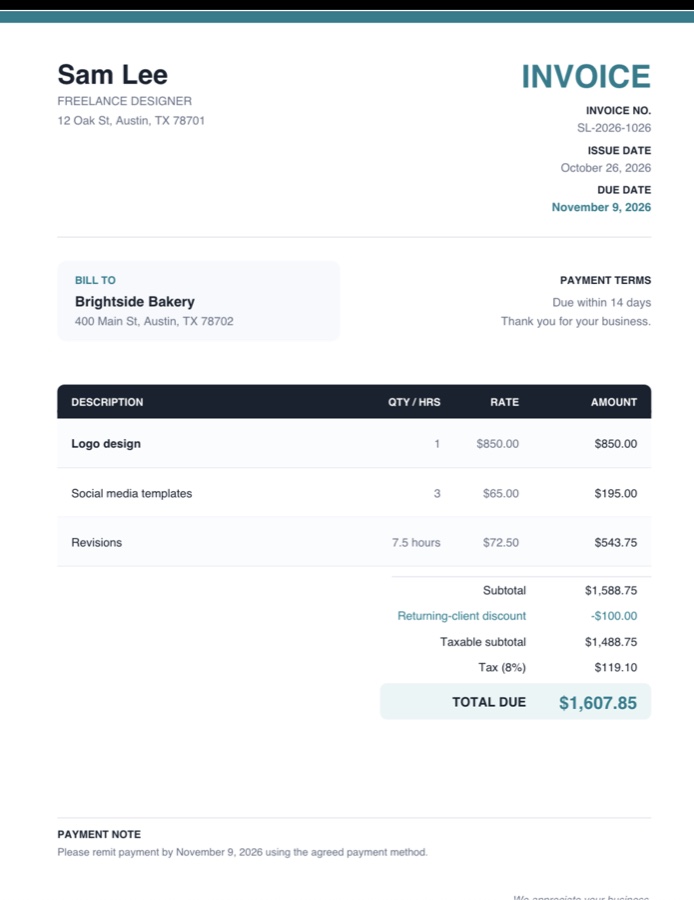
One of the PDFs from our test. The totals are right, and the payment note asks the client to pay "using the agreed payment method", which nobody had agreed.
What ChatGPT gets wrong on invoices
It doesn't say how to pay you
This was the biggest gap. One invoice had a heading called "Payment Instructions" that only repeated the due date. One flagged the problem in the chat but still called the invoice ready to send. The last one filled the space with "the agreed payment method". None of them invented bank details, which is good. But an invoice without a bank transfer, PayPal address or payment link means the client has to email you to ask, and every email like that pushes your payment back.
Every chat invents a new invoice number
We didn't give an invoice number, so ChatGPT made one up. The five chats produced SL-2026-001, SL-2026-1026-01, INV-2026-1026, INV-2026-1026-001 and SL-2026-1026. ChatGPT has no idea what your last invoice number was, so if you make each invoice in a new chat, your records end up with a different numbering scheme every time and no guarantee against duplicates. In the UK, GOV.UK lists a unique identification number as something every invoice must include, and anywhere else your accountant will want one consistent sequence.
It leaves out details you may need
None of the invoices had an email address or phone number for the freelancer, or the date the work was done. In the US, no federal rule spells out what a freelance invoice must contain, so these gaps are about getting paid and keeping clean records. In the UK, GOV.UK's invoicing rules say an invoice must include your contact information and the date the goods or service were provided. Our guide to writing a professional invoice has the full list of what to include.
It fills gaps with assumptions
We asked for "8% tax". One invoice labeled it "Sales tax (8%)". Whether you charge sales tax on a service at all depends on your state, so that's not a label an AI should pick for you. The better runs stated their assumptions, such as applying the tax after the discount, and one asked us to confirm the tax rate. Read those notes, because they're the parts ChatGPT wasn't sure about.
The math was right, and you should still check it
The old complaint that ChatGPT can't add up didn't hold in our test: five invoices, five correct totals, including the decimal line and the discount-before-tax order. Still, add up the lines yourself before you send anything. A single wrong total on an invoice costs more than the minute it takes to check, and a client who spots it will check every invoice after.
Should you paste client details into ChatGPT?
An invoice needs your client's name and address, and often more. Before you paste real client details into a chatbot, check your contract and your ChatGPT plan's data settings. We covered what each plan does with your chats in can you put client information into ChatGPT.
How to make an invoice with ChatGPT that's safe to send
Give ChatGPT the details it can't know. A prompt like this closes most of the gaps we found:
Then check it before it goes out:
- Payment method sits next to the due date.
- Invoice number is the next one in your own sequence.
- Every line shows quantity, rate and amount, and the totals add up.
- Tax is labeled the way you want it, or left off if you don't charge it.
- Your contact details and the dates of the work are there.
When an invoice generator is simpler
If you'd rather fill in boxes than write prompts, our invoice generator has a field for each part of the invoice: number, dates, your details, the client's, line items, tax rate, and notes for your payment details. It adds up the totals and makes the PDF in your browser, and nothing is sent to a server. It doesn't remember your last invoice number either, so keep your own sequence, but at least it won't make one up.
How we made this: researched and drafted with AI assistance, with any figures checked against their sources and the post reviewed by Hamza before publishing.
Frequently asked questions
Can ChatGPT make an invoice for free?
Yes. On the free plan it will write an invoice in the chat, and with Thinking on it made a downloadable PDF in our test. PDFs rely on a feature with a daily limit on free accounts, so you won't always get a file. Either way, add your payment details and invoice number before sending.
Does ChatGPT send invoices?
No. ChatGPT makes the invoice, and you send it yourself by email or through your invoicing or payment app. It also doesn't track whether the invoice was paid, so keep your own record of what's outstanding.
Can Claude or Gemini make invoices?
Yes, any of the main chatbots can draft one. We only tested ChatGPT, but the gaps we found come from what you leave out of the prompt, so give any AI your invoice number, contact details and payment method, and check the result the same way.
Is an invoice made with ChatGPT valid?
An invoice is valid because of what's on it, not because of the tool that made it. If the details are right and complete, an AI-made invoice works like any other. In the UK, check it against GOV.UK's list of what an invoice must include, and if you're VAT registered, the extra VAT invoice rules.